

 Baseball Scout
 Learn more...
SportsBoard Server -The SportsBoard Server enables college coaches to prepare for assessment events before they occur and then analyze the data collected at those events after the events occur.
The SportsBoard Server enables college coaches to prepare for tournament/showcase events before they occur and then analyze the data collected at those events afterwards. High school/club coaches could just as easily use SportsBoard Server for pre-season tryouts and post-season evaluations.
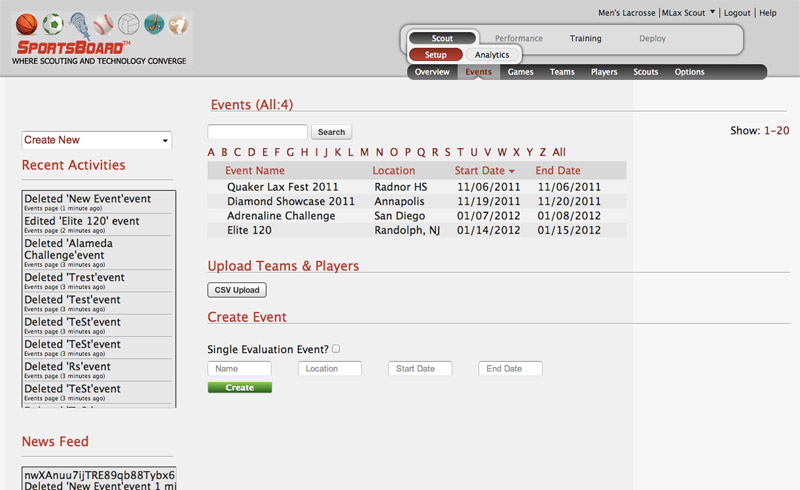
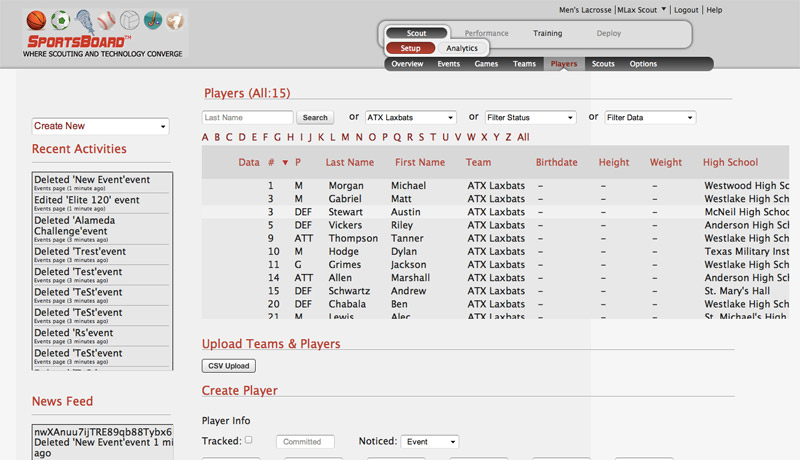 The first step in preparing for an assessment event is to define the Event you are attending as well as the Teams/Players participating in the Event. SportsBoard can import thousands of players electronically from any recruiting system, any Excel spreadsheet published by a tournament/showcase event coordinator, or any association.
Once the team/player data is in the SportsBoard Server, the server can sync with any number of iPads running a SportsBoard Scout iPad app to push all Event/Game/Team/Player information. Once complete, the iPad is now ready for coaches to use at a tournament/showcase event.
 After each day or the last day of the event, coaches can sync the SportsBoard Scout app with SportsBoard Server in order to push the asssessment data they collected up to the SportsBoard Server where it will be organized by player, synthesized with data from other coaches, and shared with other coaches for review and analysis.
With our Silver or Gold plans, coaches can then use the SportsBoard Server Weights and Analytics functions to compute Overall Composite Ratings for each player. SportsBoard Server will then organize all players by position and sort them in highest-to-lowest order by Overall Composite Rating, enabling coaches to quickly and easily determine their top-ranked recruiting candidates.
Again, with our Silver or Gold plans, SportsBoard Server can then pass any desired information to any recruiting software system you use for compliance and recruiting contact management.